Work Order
The heart of the system is the ability to track all aspects of the work being done for your customers.
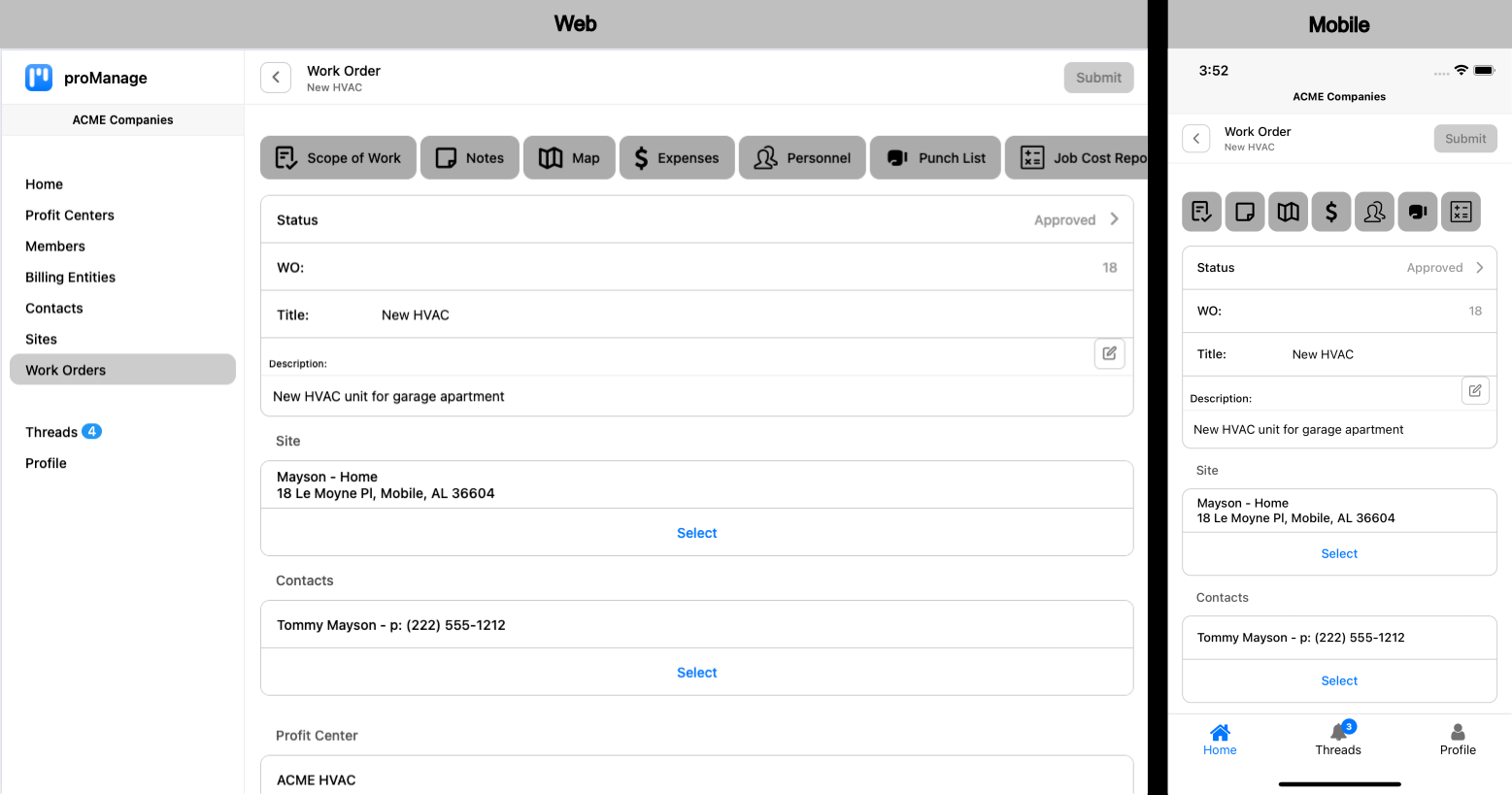
The Work Order screen provides a brief snapshot of the overall work order.
Status:
- Open - the work order has simply been added to the system.
- Tasked - the work order has been tasked to a specific member(s) of the organization with instructions on the tasked to be done, typically the member(s) are to scope the site and make an assessment of what precisely needs to be done to accomplish the desired result, i.e. a specified Scope of Work.
- Scoped - the member(s) have completed scoping the job site and provided notes, photos, etc. in order that a detailed scope of work and estimate can be delivered to the customer.
- Estimated - a detailed the scope of work, including costs associated has been completed.
- Submitted - a proposal has been submitted to the customer.
- Approved - the proposal has been approved and work can begin.
- Assigned - the work order has been.
- Completed - all work has been completed and ready to be invoiced once any exceptions to the original proposal have been documented and accounted for.
- Priced - the work order has been priced and ready for the invoice to be generated and delivered to the customer.
- Invoiced - the Invoice has been delivered to the customer.
- Closed - all work has been completed, invoice delivered and paid.
- On Hold - the work order has been put on hold until further notice.
- Cancelled - the work order was cancelled, nothing more to be done unless the status changes.
Work order number - a unique number generated by the system to identify the work order.
Title - a title for the work order to help identify what type of work is to be done.
Description - a brief description to further clarify the work to be done.
Site - the location where the work is to be done.
Contacts - site contacts for the work order - this should be the customer, whether they are the owner of the site, or a specified contact for the owner, which could also be a contractor for the site.
Profit center - the specific profit center (if more than one within the organization) that is the owner of the work order.
Across the top of the work order screen, the user will have access to (based on the privileges associated with their role within the organization):
| Web | Mobile | |
|---|---|---|
 |  | Scope of Work: Provides details for the scope of the work to be proposed and completed once approved by the customer. |
 |  | Notes: Provides for ongoing notes associated with the work order. |
 |  | Map: Provides a map showing the location of the site. |
 |  | Expenses: Provides a means to compile all expenses associated with the work order including receipts. |
 |  | Personnel: Allows a means to manage members to be added and/or removed from a work order. |
 |  | Punch List: Future enhancement… |
 |  | Job Cost Report: Provides an ongoing assessment of the costs associated with the work order including hours and expenses. |